
In this article, we will explore the concept of this security vulnerability, discussing its implications and consequences for users, as well as measures to prevent it.
It's worth noting that to learn this technique and many others, check out our cybersecurity training platform: https://hackersec.com/academy/
What is a File Upload Vulnerability?
A File Upload vulnerability refers to a flaw in a system that allows the upload and storage of files, where inadequate or absent security mechanisms enable malicious files to be uploaded and executed on the server. This vulnerability can occur due to various factors, including failures in file type verification, improper validation of submitted data, or inadequate access control.
Implications and Risks:
Once an attacker successfully exploits this vulnerability, several undesirable consequences can occur, such as:
Execution of malicious code: An uploaded file may contain malicious code, such as scripts or malware, that can be executed on the server. This allows an attacker to gain unauthorized access, steal sensitive information, control the system, or even compromise data integrity.
Overwriting existing files: If the upload functionality does not include adequate checks to prevent overwriting existing files, an attacker may replace legitimate files with malicious or harmful versions. This can result in the loss of important data or corruption of critical information.
Propagation of malware: An attacker can exploit the File Upload vulnerability to spread malware to other users. By uploading an infected file to the server, the attacker can create a distribution source for malware to infect other systems and users.
In this example, a combination of the XSS vulnerability and the File Upload vulnerability was demonstrated, where we created an .html file with an XSS payload.
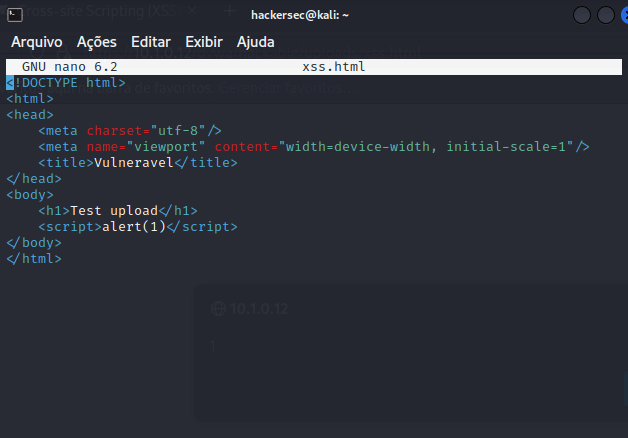
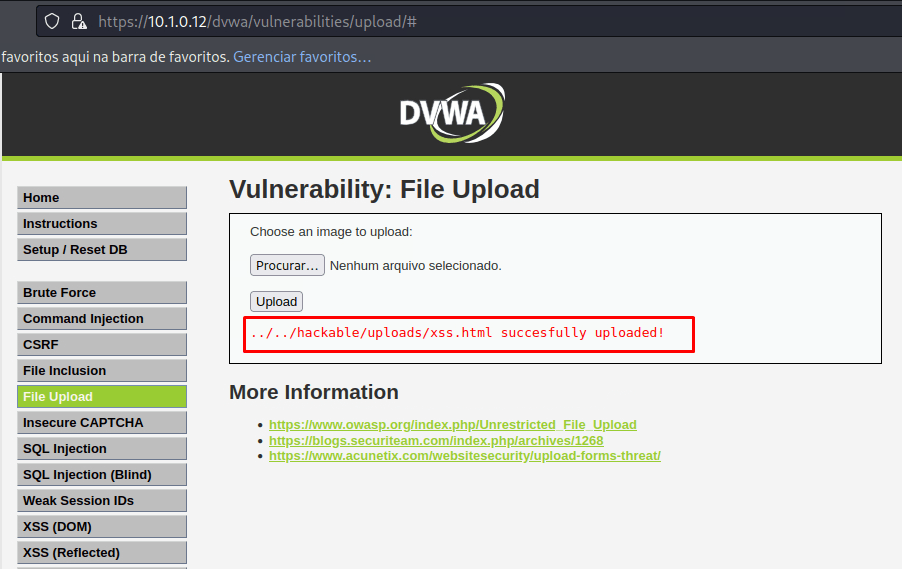
Upon uploading the file to the server, it returns the location where the file was stored.
Accessing the directory of the uploaded file, the application fails to correctly interpret the file and executes it anyway, resulting in the XSS vulnerability being triggered.

Prevention Measures
To mitigate the risks associated with File Upload vulnerabilities, appropriate preventive measures are necessary. Here are some guidelines for implementing secure file upload functionality:
File type verification: Implement strict checks on allowed file types, verifying both the file extension and its MIME header. Restrict only the necessary file types to prevent the upload of malicious files.
Data validation and sanitization: Perform adequate validation of submitted data, checking its integrity and authenticity. Additionally, sanitize the data to remove any potential malicious code.
File size restrictions: Set size limits for uploaded files to avoid server overload and reduce the risk of denial-of-service (DoS) attacks.
Separate storage for uploaded files: Store uploaded files in a separate directory with restrictions.
Validate Your Company's Cybersecurity
In addition to understanding how this type of attack works and how to mitigate it, it's also worthwhile to test your company's cybersecurity with HackerSec experts. To learn more, check out our solutions for businesses: https://hackersec.com/empresas/
Practice What You've Learned in This Article
All tests were conducted in HackerSec's CTF labs: https://hackersec.com/ctf/